Photoshop Services | Cheap Photo Editing

image manipulation services

Photo Editing Service
Blog

Why Photoshop Is The Best For Photo Editing

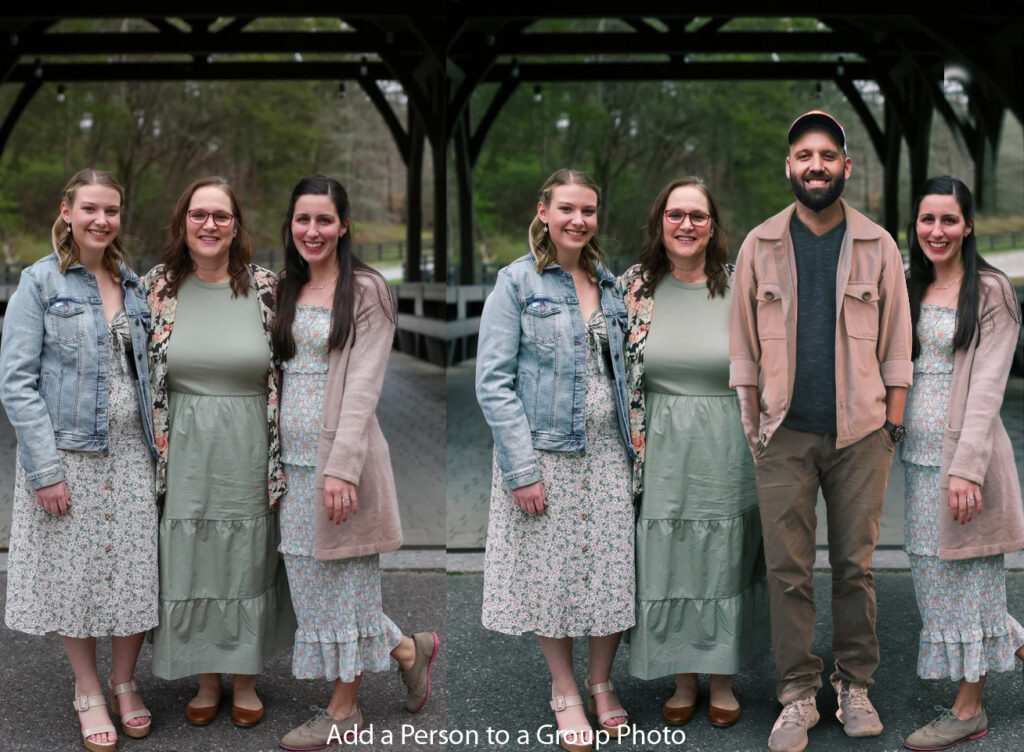
Since the beginning of the digital age, Photoshop has been and still is one of the best software for photo editing. Over time, this software has improved itself and added new features. Whether it is cropping images, adjusting colors, changing backgrounds, or professional-quality retouching—Photoshop is unique in everything. Not only professional photographers or designers, but also ordinary users can use Photoshop to make their photos more attractive. Photoshop’s greatest strength is its versatility. From print media to digital marketing, website design to advertising—Photoshop has become indispensable in almost every field. In line with modern technology, it has now added more smart tools and artificial intelligence (AI)-based features, which help you get the job done quickly and accurately. Even today, Photoshop remains at the forefront of the photo editing world and its popularity will remain unwavering in the future. Photo Editing In Photoshop’s long history and credibility When you hear the name Photoshop, the first thing that comes to mind is the best image editing software. It first came to the market in 1988, when Thomas Knoll and John Knoll created its original version together. Since then, Photoshop has gradually improved and today it has become one of the most popular and trusted photo editing software. Initially, Photoshop only provided some basic editing tools, but over time, sophisticated technology has been added to it. Adjusting colors, changing backgrounds, adding filters, or redesigning images—everything can now be done easily in Photoshop. Its biggest strength is that it has always updated itself according to the needs of users. As a result, it still holds the top position in the photo editing world. Photoshop is also unmatched in terms of reliability. Professional photographers, designers, advertising creators, and even web developers around the world choose Photoshop for their work. With its stable performance, advanced tools, and continuous innovation, users can be sure that they will get the best quality results. In addition, the use of Photoshop is not limited to professionals; ordinary users can also use it to decorate or beautify images. Due to its long-standing success and user trust, Photoshop has become a global brand today. All in all, Photoshop’s long history is not just a story of software advancement, but also a symbol of reliability, quality, and user trust. Professional Quality Photo Editing Tools One of the main reasons for Photoshop’s popularity is its professional-quality editing tools. Not only does it make image editing or design easy, but it also delivers a flawless quality output that meets the expectations of professional designers and photographers. Photoshop has the ability to use layers and masks , which allow you to break up complex images and work on them in separate parts. This allows the user to make changes to specific parts of the image, or work on the entire image if they want. In addition, using the Smart Object feature, the user can make multiple changes to the image while maintaining the original quality, which is very important for professional work. Color correction and tone control are another powerful toolset in Photoshop. Using correction layers, hue/saturation, color balance, or levels, you can precisely control the color and light balance of an image. This allows you to present the image in a more natural or creative way. Photoshop has advanced retouching tools like Healing Brush, Clone Stamp, Spot Removal, etc., which remove image defects and fix them perfectly. In addition, content-aware fill or AI-based features automatically remove unwanted parts of the image and create amazingly beautiful results. Most importantly, Photoshop’s tools work in harmony with each other, which opens up endless possibilities for the user. Whether it’s professional-level banners, logos, ad designs, or high-quality photo retouching—Photoshop’s tools are reliable and superior in all areas. Advanced color correction features One of the strengths of Photoshop is its advanced color correction facilities. The beauty of a photo largely depends on the correct color, contrast, and tone. But sometimes when taking a photo, the color gets distorted due to lighting, camera settings, or environmental factors. Photoshop solves that problem very efficiently. Photoshop has a variety of tools and options, such as Hue/Saturation, Color Balance, Levels, Curves, and Selective Color Adjustment , that can be used to change the color of an image realistically or creatively. These tools can be used to control the balance of light, fade or brighten colors, and even highlight a specific color. The most notable feature is the clarification layer . Through it, the user can change the color in a non-destructive manner. That is, the color can be changed without damaging the original part of the image, which can be fixed or corrected at any time later. Photoshop’s smart color grading feature helps create cinematic looks or professional tones. AI-based auto color correction makes images more natural-looking in seconds, making it easy for even novice users to make their photos stand out. Color correction not only enhances beauty, but also helps convey a certain mood or emotion through images. That’s why professional photographers, graphic designers, and advertising creators have been using Photoshop’s advanced color correction features as an integral part of their work. Overall, Photoshop’s color correction tools have the incredible power to transform an ordinary image into professional, artistic content. Excellence in background removal and replacement One of the most popular features of Photoshop is background removal and replacement. This feature is very important in the modern design and photo editing world, because the quality of an image depends largely on the background. Professional Photoshop users know that changing the background correctly can make even ordinary images look perfect. Photoshop has a variety of advanced tools, such as the Magic Wand, Quick Selection Tool, Pen Tool, and Select and Mask options . These can be used to quickly and accurately isolate the content of an image. Photoshop’s tools are especially great for complex backgrounds, such as tufts of hair, fur, or transparent objects. Additionally, Photoshop’s AI-based “Remove Background” feature automatically isolates the main content of an image, allowing users to remove backgrounds in seconds, which was previously time-consuming. Photoshop gives users unlimited freedom when it comes to changing backgrounds. Users can use a

Adobe Photoshop
Blog

Why Photoshop software is important for editing your photos

Amidst the rapid advancements of modern technology, a photo is not just a snapshot of a moment—it is an expression of personality, professionalism, and creativity. Whether it’s social media, e-commerce, portfolio, or personal branding—a perfect, eye-catching photo can instantly capture the attention of the viewer. However, not all photos come out of the camera exactly the way we want them to. That’s where Photoshop photo editing plays a vital role. This powerful technique allows users to enhance, retouch, and transform images to match their vision and purpose. To solve the common issues found in raw images—such as lighting imbalances, background distractions, or skin imperfections—professionals and creatives around the world rely on one of the most effective and popular software tools available today: Adobe Photoshop. Photoshop is a tool that makes photo editing professional and perfect. If you want to present an ordinary photo in an extraordinary way, then there is no alternative to Photoshop. Through it, you can easily control the light, shadow, contrast, color, etc. of the photo. Even changing the background of the photo, removing unwanted parts, smoothing the skin, photo retouching and much more are possible very easily. Photoshop is an essential software, especially for photographers, graphic designers, digital marketers, and e-commerce businesses. Because good photos mean good impressions, and good impressions mean customer trust and confidence.   So, Photoshop is not just a photo editing software—it is a powerful tool to improve the quality of your photos. If you want your photos to be more attractive, professional, and captivating, then using Photoshop will be your best decision. How Photoshop makes an ordinary photo extraordinary   A picture can express more than a thousand words. But not all pictures come out of the camera lens as perfectly as we want. Sometimes the light in the picture is low, the background is messy, spots on the face or unnecessary objects are visible. At this stage, a powerful and efficient photo editing tool is needed, which is called Adobe Photoshop . Photoshop is a software that can transform even a simple, ordinary quality photo into a professional, attractive and artistic photograph. Using its various tools and features, every subtle aspect of the photo, including color, contrast, brightness, saturation, can be perfectly adjusted. This brings the photo back to life. Photoshop can be used to enhance your beauty by removing acne, blemishes, or wrinkles. It is possible to change the background, remove unwanted objects, adjust light and shadow, and even add completely new objects to the image. All of these can transform an ordinary photo into a completely new look—attractive, professional, and eye-catching. From personal photos to business product photography, from social media content to digital marketing—Photoshop is incredibly important in every field. Because a beautiful photo means more attention, more focus, and therefore more opportunities. In other words, Photoshop is not just an editing software, it is a powerful tool for creativity and perfect presentation, which makes an ordinary photo extraordinary. Using Photoshop to remove or change the background   In an increasingly technology-driven world, the beauty and professionalism of a photo largely depends on its background. Just as a perfect background can make a photo more attractive, a messy or unnecessary background can ruin the beauty of the entire photo. It is at this point that Adobe Photoshop gives us a wonderful solution—the ability to remove or change the background. With the help of Photoshop, you can easily remove the background of a photo while retaining the main subject or add a new background as desired. This brings innovation, professionalism, and visual appeal to the presentation of the photo. Changing the background is an important step, especially in creating e-commerce, fashion photography, product catalogs, portfolios, or social media posts. Background cutting or changing can be done accurately using various tools in Photoshop such as Pen Tool, Quick Selection Tool, Remove Background Option, Layer Mask , etc. If you want, you can add a natural background, a monochrome background, or a fully designed graphic background to the back of the image. These actions not only make the image visually appealing, but they also increase the viewer’s interest and trust in your brand, presentation, or product. So, it can be said that Photoshop’s background removal or modification feature makes an ordinary photo look extraordinary and professional. This feature can take your photo to a new level. Photoshop to improve the quality of e-commerce product photos   Nowadays, e-commerce business is growing at a huge rate. The first thing a customer sees while shopping online is the product image . A clear, professional and attractive image plays a huge role in increasing the sales of a product. But most of the time, raw images are not directly usable. This is where Adobe Photoshop becomes an indispensable tool. Photoshop can be used to edit e-commerce product photos to make them look professional, bright, and believable. You can remove the background and use a solid or transparent background, which increases the focus of the product. You can add shadows to give the product a more realistic and premium look. In addition, color correction, exposure adjustment, scratch or dust removal, and adjusting the angle or composition of the photo are also easily possible with Photoshop. Especially on e-commerce platforms like Amazon, eBay, Daraz, or Shopify that have specific image guidelines, the use of Photoshop becomes essential to comply with them. Because good quality images not only increase sales, but also demonstrate the buyer’s trust and professionalism in the brand. A properly edited product photo encourages buyers to buy with confidence, while a bad photo can discourage them from buying. Therefore, it goes without saying how profound the importance of Photoshop in improving the quality of product photos is for the success of e-commerce businesses. Perfect photoshop photo editing for social media posts   In the age of social media, an attractive image or visual content can be the biggest identity of your personality, brand or product. Whether it’s Facebook, Instagram, TikTok, Pinterest or LinkedIn—the visual quality of an image or post is

Photoshop Blog

Expert Photoshop Editing: Transform Your Images Today!

  Our modern society, where visual aesthetics hold immense importance, the quality of images plays a vital role in shaping a brand’s online presence, marketing strategies, or personal projects. Whether you are a professional photographer, a business owner, or an individual seeking to enhance personal photos, the significance of expert photoshop editing cannot be emphasized enough. With its wide range of tools and techniques, Photoshop offers the ability to transform ordinary images into extraordinary works of art, taking them to new heights of visual appeal and impact.   The versatility of Photoshop lies at the core of its appeal. From basic adjustments like color correction and cropping to more advanced techniques such as photo manipulation and compositing, Photoshop provides a comprehensive toolkit for enhancing and refining images. With the guidance of experienced professionals who are well-versed in the software’s capabilities, the creative possibilities become virtually limitless.   Accuracy Editing Techniques for Professional Results Having a solid grasp of Photoshop is essential in the world of digital image manipulation. It allows you to create top-notch outcomes by utilizing a variety of tools and techniques. With Photoshop, you can make subtle tweaks and intricate modifications to bring your artistic vision to life. However, to elevate the quality of your work, it’s crucial to master precise editing techniques. This article will explore fundamental methods to achieve precise and flawless results in your editing endeavors.   It is essential to acquire expertise in precise Photoshop editing techniques in order to achieve professional-grade results in the field of digital image editing. By becoming familiar with color modes, fine-tuning your monitor settings, adopting non-destructive editing practices, and utilizing precise tools and methods, you can elevate the quality of your work and create visually captivating images that captivate and inspire. Through dedication and attention to detail, precise editing transforms from a simple skill into a symbol of excellence in the realm of digital artistry. One of the key advantages of expert Photoshop editing is its ability to rejuvenate images by eliminating imperfections or flaws. Whether it involves removing blemishes from a portrait, eliminating distracting elements from a landscape, or restoring old photographs to their former glory, Photoshop enables meticulous attention to detail, resulting in seamless edits that appear natural and polished.   Furthermore, Photoshop offers incomparable creative freedom, empowering users to unleash their imagination and bring their unique visions to life. From surreal photo manipulations to breathtaking digital artwork, the only limit is one’s own creativity. With the right expertise, even the most ambitious ideas can be realized with precision and finesse, opening up a world of opportunities for artistic expression and storytelling.   Beyond Basic Editing: Advanced Tools and Techniques Photoshop is the go-to software for digital image editing, providing a wide range of tools and techniques that go beyond the basics. While it’s important to master the fundamentals, diving into advanced Photoshop tools and techniques can enhance your editing skills significantly, enabling you to achieve polished and professional results. This article will delve into some of the most powerful advanced tools and techniques in Photoshop that can elevate your editing abilities and broaden your creative horizons.   In today’s competitive market, Photoshop editing plays a vital role in not only enhancing individual images but also in maintaining brand consistency and professionalism. Businesses can leverage Photoshop to create visually appealing graphics for social media campaigns, design eye-catching advertisements, and enhance product photos for e-commerce platforms. This expert editing ensures that every visual element aligns seamlessly with a brand’s identity and message, ultimately contributing to its success.   Moreover, the benefits of expert Photoshop editing extend beyond aesthetics. By improving the visual appeal of images, businesses can effectively capture their target audience’s attention, drive engagement, and achieve marketing goals. Whether the objective is to boost conversions, increase brand awareness, or foster customer loyalty, the impact of high-quality visuals is significant.   Restoration and Retouching: Breathing Life into Old Photos Photos have a timeless charm, immortalizing memories and freezing moments in history. However, as time goes by, these beloved images may start to show signs of wear and tear such as faded colors, creases, and blemishes. Thankfully, advancements in digital editing software like Photoshop have made it possible to revive and improve old photos. This piece explores the intricate art of revitalizing vintage photos through restoration and enhancement methods. Restoration and retouching are powerful tools for preserving and revitalizing old photos. Through careful assessment, digital preservation, cleaning, color correction, and repair, it’s possible to breathe new life into even the most damaged and faded images. With patience, skill, and a touch of creativity, old photos can be transformed into timeless treasures, preserving memories for generations to come.   In summary, expert Photoshop editing is a valuable tool for individuals and businesses aiming to enhance the quality and impact of their images. Whether you are a professional photographer, a business owner, or an individual seeking to improve personal photos, utilizing Photoshop unlocks a world of creative possibilities. With its unmatched versatility, precision, and creative freedom, Photoshop empowers users to turn ordinary images into extraordinary pieces of art, leaving a lasting impression on viewers and achieving desired outcomes.      

Scroll to Top