
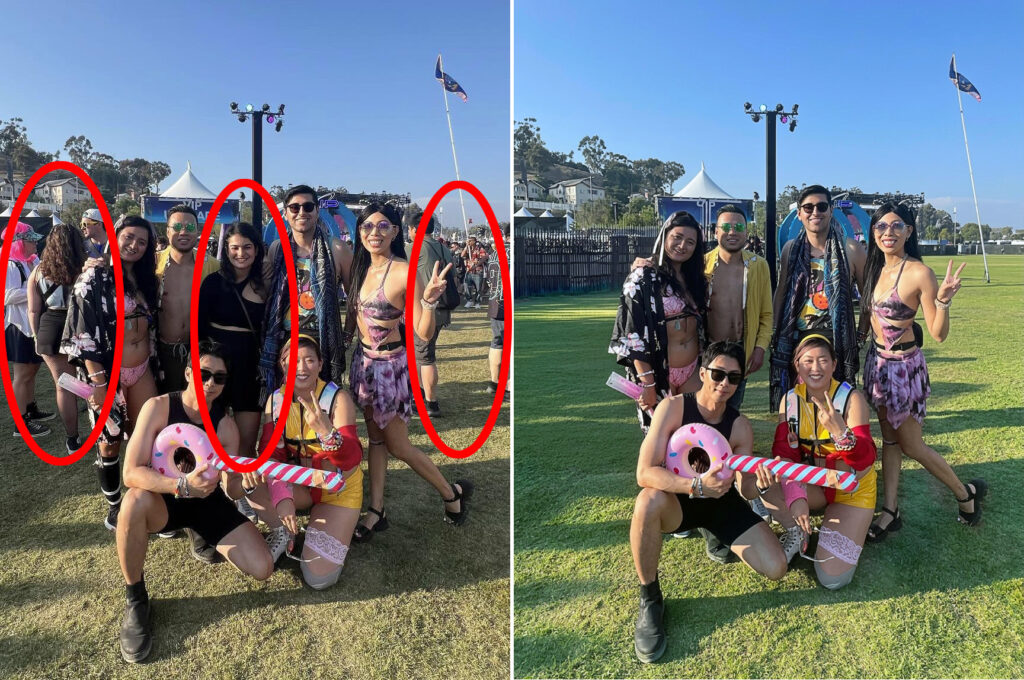
Hire a Photoshop Expert to Remove People from Group Photos
Group photos are meant to preserve moments. A family reunion, a wedding, a trip with friends. But sometimes the photo isn’t quite right because of an uninvited face in the background, a stranger who walked into the shot at the worst possible time, or someone you simply don’t want in the final image anymore. That’s when you need a reliable Photoshop Expert that can remove people from a group photo cleanly, quickly, and without leaving any trace. It sounds like a small thing. But getting it done right makes a massive difference to the final result. Most people don’t realize just how much goes into a proper removal. It’s not just erasing a person. It’s rebuilding whatever is behind them, correcting the lighting, matching textures, and making the whole image look like it was never touched. That’s a job for someone who really knows what they’re doing. How to Remove People from a Group Photo in Photoshop Adobe Photoshop gives professional Photoshop experts a powerful set of tools designed specifically for this kind of work. The two most commonly used are Content Aware Fill and the Clone Stamp Tool. Both are built into Photoshop, but using them well takes real skill and practice. Content Aware Fill works by analyzing the surrounding pixels and intelligently filling in the area where the person was. When the background is simple, like a plain wall or a stretch of grass, it does an impressive job on its own. But most real photos aren’t that simple. Busy backgrounds, overlapping subjects, and uneven lighting all create problems that need to be fixed manually afterward. Look, the Clone Stamp Tool is definitely the ‘slow and steady’ option, but the control you get is honestly unmatched. You’re basically hand-picking pixels from one spot and painting them right over the junk you want gone. Yeah, it takes a minute and a lot of patience, but it’s the only way to get a clean look when you’re dealing with messy or high-detail backgrounds. Most of us don’t just rely on one trick, though—you’ve got to be flexible and swap between tools depending on what the specific frame is throwing at you. Advanced Photo Retouching Methods That Make the Difference Object removal from photos isn’t just about the tools. It’s about understanding light, shadow, perspective, and texture. A good Photoshop expert knows that removing someone from a photo also means removing their shadow, correcting any reflections they might have left behind, and rebuilding parts of the background that were hidden behind them. These are the details that separate a clean edit from one that looks obviously manipulated. Photo manipulation techniques in Photoshop go deep. Layer masking, frequency separation, perspective matching, these are all part of the toolkit that advanced retouchers use to handle difficult removals. When you hire a Photoshop expert, you’re not just paying for someone to press delete. You’re paying for all the years of knowledge that go into knowing exactly what to do next. How to Remove a Person from a Photo Without Photoshop It’s totally fine if you don’t have a Photoshop subscription—not everyone wants to pay that ‘Adobe tax.’ Honestly, you can find plenty of free online tools that get the job done just as well for a quick fix. Platforms like Adobe Express or Canva are great for this, and there are a ton of newer AI-driven editors out there that can wipe someone out of your background with just a couple of clicks. You don’t need fancy software to get a clean shot anymore. These tools work fine for quick fixes on simple images. But they struggle with anything complex. High-resolution photos, busy backgrounds, subjects that overlap with other people in the frame, these are all cases where free tools fall short. The results can look smudgy, pixelated, or just obviously wrong. The best way to remove someone from a picture. Especially if it’s for professional use, is still to work with an experienced human editor. No app can match the judgment and precision of someone who has been doing this work for years. Remove Strangers from Travel Photos and Fix Group Shots Travel photography comes with a frustrating problem. You spend time and money getting to an incredible location, you set up the perfect shot, and then a stranger walks right into the frame at the last second. It happens constantly. And in busy tourist destinations, it can be nearly impossible to avoid. The good news is that removing strangers from travel photos is one of the most common requests professional editors receive. Whether it’s a single person in the background or a crowd of tourists behind you at a famous landmark, a skilled editor can clean up the background and make it look like you had the place to yourself. It’s one of the most satisfying edits to see come together. Group shots come with their own challenges. Someone blinked, looked away, showed up who you’d rather not include in the family album. Fixing a group photo by removing extra people requires careful attention to detail. Especially when the person being removed is standing close to or partially overlapping with someone you want to keep. Professional Photo Editing Service USA: Why Businesses Use It For businesses, image retouching services aren’t a luxury. They’re a basic part of producing professional content. eCommerce brands need clean product shots. Clean, distraction-free shots are a non-negotiable for real estate agencies—nobody wants to see a cluttered room when they’re trying to sell a house. The same goes for corporate teams. If you’re putting together group photos for a website or a big marketing push, everything needs to look polished and professional. At the end of the day, it’s all about making sure the focus stays on the property or the people, not some random background mess. This is exactly why a lot of businesses just outsource their photo editing instead of trying to grind through it in-house. Honestly, it’s usually way